

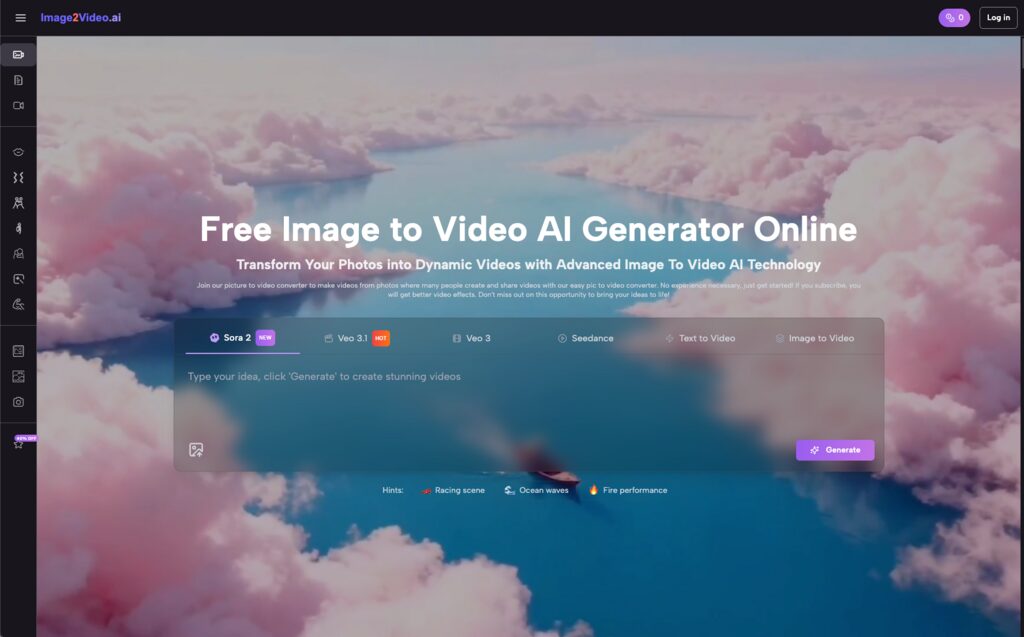
Video content is no longer optional. If you are a solo marketer or part of a small team, you already know the pressure. The algorithm demands motion, but your schedule (and budget) usually only allows for static graphics. This is where the surge of image to video tools promises a lifeline.
However, if you have tried these tools, you might have hit a wall. You upload a crisp photo, type a prompt, and get back a weirdly warping video that looks nothing like your vision. You aren’t alone. The gap between “tech demo” and “usable marketing asset” is often wider than advertised.
The good news? The technology has matured. We are moving past the experimental phase into a utility phase. You don’t need to be a prompt engineer or a video editor to make this work. You just need to understand how the machine “thinks” about motion.
This guide explores how to bridge that gap. We will look at why early attempts fail, how to build a reliable workflow using a free picture to video converter, and the specific mistakes that kill quality.
Contents
Why The “Magic Button” Often Disappoints
When I first started experimenting with generative video tools about two years ago, my hit rate was terrible. I treated the software like a mind reader. I would upload a product photo, hit generate, and hope for a commercial.
The reality of Image to Video AI is that it is less about magic and more about translation. The AI is trying to interpret two things simultaneously: the pixels in your image and the intent in your text. When those two conflict, you get artifacts—those strange morphing glitches that ruin a video.
Many users struggle because they overcomplicate the input. They ask for complex camera movements and character action and lighting changes all at once. The current generation of tools thrives on simplicity. The goal isn’t to create a movie; it’s to add compelling motion to a static asset.
Understanding this limitation is the first step to mastering photo to video workflows. Once you stop trying to force the AI to be a film director and start treating it as an animator, your results improve instantly.
A Practical Workflow: From Static Image to Dynamic Video
Let’s break down a repeatable process. You don’t need expensive software installed on your desktop. A web-based Image to Video AI generator is usually sufficient for social media clips and ads.
Here is the four-step framework that consistently yields usable results.
- Curating Source Material
The output quality is entirely dependent on your input. The AI cannot “fix” a blurry or poorly lit photo. It uses the existing pixels to predict the next frames.
Ensure your source file is a high-quality JPEG or PNG. If you are using this for e-commerce, the product should be clearly defined against the background. If the edges of your subject are muddy in the photo, they will tear and warp when the Image to Video AI tries to animate them.
- The Art of the Prompt
This is where most people get stuck. After you upload your picture to the converter, you need to describe your vision.
The trick is to use natural language but focus on movement. Don’t describe the image again (the AI can see it). Describe the change.
- Bad Prompt: “A woman drinking coffee in a cafe.” (This describes the static state).
- Good Prompt: “Slow zoom in, steam rising from the cup, subtle hair movement.” (This describes the motion).
Our goal with Image to Video AI is to guide the animation engine. Be specific about camera movement (pan, zoom, tilt) and subject movement (wave, run, smile).
- The Processing Phase
Once you hit generate, the system takes over. On most platforms, including the tool detailed here, you will see a “processing” status.
This typically takes about 5 minutes. It’s tempting to refresh the page or get impatient, but high-quality rendering takes server power. The AI is calculating how light and texture should shift frame by frame. Use this time to prep your next asset.
- Review and Iteration
When the status hits “Completed,” you will have an MP4 file ready. Watch it on a loop. Does the movement look natural?
If the Image to Video AI produced a weird result, don’t scrap the project. Tweak the prompt. Often, simplifying the instruction fixes the issue. If you asked for a “pan right” and “subject walking left,” try removing one of those instructions.

Real-World Applications for Small Teams
You might be wondering, “Okay, I can make a picture move, but how does that help my business?”
The value of Image to Video AI isn’t in creating full-length features; it’s in micro-content. Here are three specific ways to use this technology right now.
Breathing Life into E-commerce
Static product shots are standard, but they blend into the background on Instagram or TikTok.
- The Play: Take a high-res photo of your product. Use Image to Video AI to add a “slow 360 rotation” or a “camera orbit.”
- The Result: You get a dynamic showcase that catches the eye in a feed, increasing dwell time on your ad without the cost of a video shoot.
Revitalizing Old Content
Content creators often sit on hard drives full of travel photos or event pictures that were posted once and forgotten.
- The Play: Upload these archives to a photo to video tool. Turn a landscape photo into a panning video.
- The Result: You have fresh “new” content for Reels or YouTube Shorts without shooting anything new. It is an efficient way to maintain a consistent posting schedule.
Educational Visuals
For educators and trainers, diagrams can be dry.
- The Play: Take a static infographic or diagram. Use the tool to animate specific elements, like arrows moving or charts growing.
- The Result: Complex concepts become easier to digest. An animated lesson is far more engaging than a slide deck.
Common Mistakes That Ruin Your Output
Even with the best Image to Video AI tools, user error is common. Avoiding these pitfalls will save you hours of frustration.
The “Too Much Motion” Trap
I learned this the hard way. I used to ask for “explosions,” “running,” and “camera flying” all in one prompt. The result was always a mess of pixels.
The Fix: Stick to one primary motion. If the camera is moving, keep the subject relatively still. If the subject is moving fast, keep the camera steady.
Ignoring Aspect Ratios
While many tools handle various inputs, uploading a tiny square image and expecting a cinematic widescreen video can lead to quality loss.
The Fix: Crop your source image to the desired aspect ratio (like 16:9 for YouTube or 9:16 for TikTok) before uploading it to the Image to Video AI generator.
Disregarding the Duration Limits
Most current generation tools, including the one discussed, are optimized for short bursts—often around 5 seconds.
The Fix: Don’t try to tell a whole story in one generation. Think of these as “shots” or “clips.” If you need a longer video, generate multiple 5-second clips and stitch them together in a video editor.

Technical Considerations for Non-Technical
One of the biggest barriers to entry for video production is hardware. Rendering video usually requires a powerful computer.
The advantage of modern Image to Video AI platforms is that they are cloud-based. The heavy lifting happens on a remote server, not your laptop. This means you can use these tools on a Chromebook, an older office PC, or even your smartphone.
Mobile Accessibility: Since the tool is a web app, it works on iOS and Android browsers (Safari, Chrome). This is huge for social media managers who work on the go. You can snap a photo on your phone, upload it to the photo to video converter, and download the MP4 result directly to your camera roll for posting.
File Formats: Stick to standard formats. The input should be JPEG or PNG. The output will almost always be MP4, which is the universal standard for social platforms. You don’t need to worry about codecs or bitrates; the Image to Video AI handles that optimization for you.
Conclusion: The Future is Moving
The transition from static imagery to video is inevitable. Algorithms favor it, and audiences prefer it. Image to Video AI is the bridge that allows creators without video skills to cross that divide.
By understanding the limitations—keeping prompts simple, using high-quality inputs, and iterating on your results—you can turn a folder of JPEGs into a library of engaging video assets.
Technology is here, it is free to try, and the learning curve is flatter than ever. Whether you are looking to spice up a “photo funny video” for friends or create professional ads, the best time to start experimenting with picture to video is now. Upload a photo, type a prompt, and see what moves.

Zack Hart
Hey there! I’m Zack Hart, the pun-dedicated brain behind PunsClick.
Based in Alaska, I built this site for everyone who believes a well-placed pun can brighten a dull day.
Whether you’re into clever wordplay or cringe-worthy dad jokes, you’ll find your fix here. We’re all about bringing the world closer — one pun at a time.