

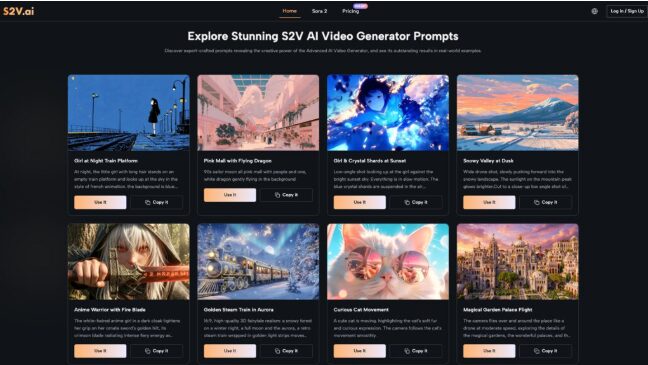
Creating professional-quality video content has never been more accessible, thanks to tools like Sora 2 AI Video Generator. Designed to transform ideas into cinematic reality, Sora 2 bridges the gap between creativity and technology. However, like any advanced tool, it comes with a learning curve that can be intimidating, especially for non-experts. Many users struggle to unlock its full potential, often due to unrealistic expectations or a lack of clear guidance.
In this guide, we’ll explore why people often face challenges with AI video generators, how to get started with Sora 2 AI, and the common mistakes to avoid. Whether you’re a solo creator or part of a small marketing team, this article will equip you with practical tips to make the most of this powerful platform.
Contents
Why Many Struggle with AI Video Generators
AI video generators, including Sora 2 AI, promise to simplify content creation, but they can feel overwhelming for first-time users. Here are some of the main reasons why:
- Unrealistic Expectations
Many users approach tools like Sora 2 Video Generator expecting instant, flawless results. While the platform is incredibly advanced, generating high-quality videos still requires thoughtful input. For instance:
- Poorly written prompts often lead to generic or irrelevant outputs.
- Overloading the AI with overly complex requests can produce mixed results.
- Lack of Familiarity with AI Workflows
AI tools operate differently from traditional video editing software. Users unfamiliar with text-to-video workflows may struggle to translate their ideas into actionable prompts. For example, describing a scene in natural language might feel awkward at first, especially if you’re used to working with visual timelines.
- Skipping the Learning Phase
AI video generators like Sora 2 AI are designed to be beginner-friendly, but that doesn’t mean you can skip the learning phase entirely. Many users dive in without exploring the platform’s capabilities, leading to frustration when results don’t match expectations.
How to Get Started with Sora 2 AI Video Generator
If you’re new to AI video creation, the good news is that Sora 2 AI Video Generator is designed to be intuitive and accessible. Here’s how you can get started without needing advanced skills:
- Start Small and Experiment
The key to mastering Sora 2 Video Generator is starting small. Instead of attempting a complex multi-scene video right away, begin with a single, simple prompt. For example:
- Prompt Example: “Create a 10-second video of a sunset over a mountain with calming background music.”
This approach allows you to see how the AI interprets your input and helps you refine your descriptions over time.
- Use the Right Model for Your Needs
Sora 2 AI offers multiple models tailored for different purposes:
- Basic Model: Perfect for quick, high-quality content.
- Pro Model: Ideal for cinema-grade videos with enhanced control.
- Pro Storyboard: Best for multi-scene narratives and longer projects.
If you’re unsure where to start, the Basic Model is a great entry point. As you grow more comfortable, you can experiment with the Pro and Storyboard models for advanced projects.
- Leverage Image-to-Video Features
If text-to-video feels intimidating, start with Sora 2’s image-to-video functionality. Upload a static image, add a simple motion description (e.g., “pan left with dramatic lighting”), and let the AI animate it. This feature is especially useful for product demonstrations or turning photos into dynamic visuals.
- Refine Your Prompts
AI-generated videos improve significantly with better prompts. Here are some tips for writing effective prompts:
- Be specific: Instead of “a person walking,” try “a woman walking through a busy city street at sunset.”
- Include style and mood: Add details like “cinematic,” “playful,” or “dramatic” to guide the AI.
- Use iterative feedback: Generate multiple versions and tweak your prompts based on the results.
- Take Advantage of Native Audio Integration
One of the standout features of Sora 2 AI Video Generator is its native audio generation, available through models like Veo 3. This feature automatically adds sound effects, ambient noise, and dialogue to your videos, saving you time in post-production. To get started, simply describe the audio you want alongside your visual prompt.
Common Mistakes to Avoid When Using Sora 2 AI
While Sora 2 Video Generator simplifies video creation, there are common pitfalls that can derail your progress. Here’s what to watch out for:
- Overloading Your Prompts
It’s tempting to include every detail in a single prompt, but this often confuses the AI. For example:
- Overloaded Prompt: “A futuristic city with flying cars, neon lights, robots walking on the streets, and a dramatic orchestral soundtrack.”
- Simpler Prompt: “A futuristic city with flying cars and neon lights at night.”
Break complex ideas into smaller pieces and generate them separately to achieve better results.
- Ignoring Model Differences
Each model in Sora 2 AI is designed for specific use cases. Using the Basic Model for a multi-scene narrative, for instance, will likely lead to inconsistent results. Take the time to understand which model suits your project.
- Skipping Prompt Iteration
Your first attempt won’t always be perfect, and that’s okay. Many users give up too quickly instead of iterating on their prompts. Small adjustments—like changing the wording or adding more detail—can dramatically improve the output.
- Neglecting Post-Generation Refinements
While Sora 2 AI Video Generator produces impressive results, minor tweaks may still be needed to align the video with your vision. Don’t hesitate to use basic editing tools or regenerate specific elements for a polished final product.
Why Sora 2 AI Video Generator is Ideal for Beginners
Despite its advanced capabilities, Sora 2 AI Video Generator is highly approachable for beginners. Here are a few reasons why:
- Intuitive Interface: The platform simplifies complex AI workflows, making it easy to generate videos with minimal effort.
- Flexible Models: From quick drafts to professional-grade videos, there’s a model for every skill level.
- No Editing Experience Required: You can create high-quality videos without any prior editing knowledge, thanks to the platform’s automated features.
From my own experience, starting with smaller projects made the tool feel less overwhelming. For example, I used the Basic Model to create short social media clips, which helped me build confidence before tackling more complex projects.
Unlocking the Full Potential of Sora 2 AI
To truly get the most out of Sora 2 AI Video Generator, keep these strategies in mind:
- Experiment Regularly: The more you use the platform, the better you’ll understand its capabilities and limitations.
- Learn from the Community: Join forums or social media groups where other creators share their experiences and tips.
- Stay Updated: AI tools evolve rapidly. Keep an eye on new features and updates to ensure you’re leveraging the latest capabilities.
Conclusion: From Confusion to Creation with Sora 2 AI
The Sora 2 AI Video Generator is a game-changer for content creators, solo marketers, and small teams looking to produce professional-quality videos without advanced skills. While the learning curve can be steep, starting small, refining your prompts, and avoiding common mistakes can make the process far more manageable.
Whether you’re creating quick social media clips or cinematic multi-scene narratives, Sora 2 AI Video Generator provides the tools you need to bring your ideas to life. With a bit of patience and practice, you’ll find that creating stunning videos with Sora 2 AI is not only possible but genuinely enjoyable.
Ready to turn your ideas into cinematic reality? Start experimenting with Sora 2 Video Generator today, and watch your creativity come to life.

Zack Hart
Hey there! I’m Zack Hart, the pun-dedicated brain behind PunsClick.
Based in Alaska, I built this site for everyone who believes a well-placed pun can brighten a dull day.
Whether you’re into clever wordplay or cringe-worthy dad jokes, you’ll find your fix here. We’re all about bringing the world closer — one pun at a time.