

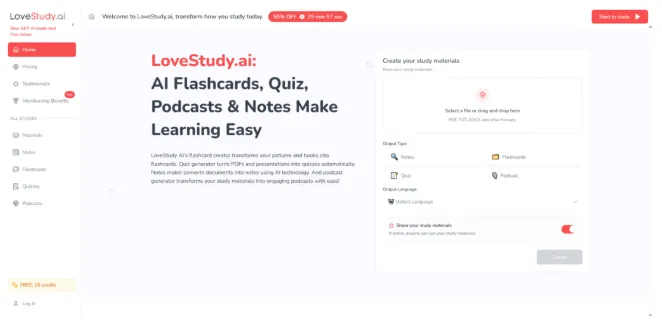
You’ve probably had this experience: your browser has twelve tabs open, your PDF is 80 pages long, the lecture slides are dense, and your notes feel like a wall of text. You’re “busy studying,” yet it’s hard to prove you actually remember anything. That gap—between exposure and recall—is where flashcards quietly shine. The problem is that building a good deck often takes as long as the studying itself. When I tested LoveStudy.ai, I approached it less as a flashy AI tool and more as an attempt to shorten the distance between “I have material” and “I can retrieve it.” The Flashcards Maker ended up feeling like a bridge: imperfect in places, but surprisingly good at getting me from raw content into a repeatable recall loop.
Contents
- 1 A Different Lens: Flashcards as “Compression,” Not Just Memorization
- 2 What LoveStudy.ai Adds to the Compression Process
- 3 Before vs After: What Changes in Your Study Session
- 4 A More Nuanced Comparison: What Each Approach Optimizes For
- 5 Where It Felt Most Useful (and Why)
- 6 How to Make the Output Feel More Reliable
- 7 Limitations That You Should Expect (and Plan Around)
- 8 A Low-Stakes Way to Try It Without Overcommitting
A Different Lens: Flashcards as “Compression,” Not Just Memorization
Most people think flashcards are about memorizing. Another way to see them is as compression.
What you’re really doing
You’re taking a large, messy body of information and forcing it into:
- prompts that trigger retrieval
- answers that are short enough to check
- structure that can be repeated daily
That compression is difficult. It’s also why flashcards work: the format pushes you to define what matters.
Where the process breaks
Compression is effortful. If you have to do all the compression manually, you often postpone it. The system fails before the learning begins.
What LoveStudy.ai Adds to the Compression Process
LoveStudy.ai frames flashcards as part of a broader study workflow (notes, quizzes, podcasts), but the Flashcards Maker is most interesting when you treat it as a “first draft compressor.”
How I used it in practice
I uploaded a focused chunk of material rather than an entire course pack, generated a deck, then studied immediately. The first review session wasn’t about perfection—it was about discovering:
- what the tool guessed correctly
- what it misunderstood
- what I needed to rewrite for my own brain
That experience matters because it shifts your time investment away from formatting and toward correction based on actual misses.
Before vs After: What Changes in Your Study Session
Before: You spend the session preparing to study
- Read through everything again.
- Highlight and re-highlight.
- Decide what to turn into cards.
- Create a few cards.
- Run out of time.
After: You spend the session proving what you know
- Generate a draft deck quickly.
- Start recall immediately.
- Identify weak spots through misses.
- Fix only the cards that caused friction.
- Repeat tomorrow.
This is not “effortless.” It’s more honest. The tool reduces the startup cost so your effort can go into retrieval, which is where learning compounds.
A More Nuanced Comparison: What Each Approach Optimizes For
| Method | What it optimizes for | What it costs you | Typical outcome | Who it fits best |
| Manual flashcards | Precision and control | Time + cognitive overhead | Great decks, but often incomplete | People with ample time or small syllabi |
| DIY flashcard apps | Customization and long-term tuning | Setup and maintenance | Strong systems, but slow to start | “System builders” who enjoy configuration |
| LoveStudy.ai Flashcards Maker | Speed to first recall session | Some editing/iteration | Earlier practice, iterative refinement | Busy learners and high-volume materials |
The main point: different tools solve different pain. LoveStudy AI value is not replacing your judgment—it’s getting you to the moment where judgment is most useful: after you’ve tried to recall.

Where It Felt Most Useful (and Why)
1. Dense PDFs and slide decks
These are painful to turn into cards manually. A generator is most helpful when the raw content is already structured and factual.
2. Vocabulary, definitions, processes
Material that has clear “prompt → answer” structure tends to translate better into flashcards.
3. Catch-up weeks
When you’re behind, the worst thing you can do is spend your limited time building a perfect deck. A “good enough” deck that lets you start recalling today can be more valuable than a perfect deck you finish next week.
How to Make the Output Feel More Reliable
If you want AI-generated flashcards to feel trustworthy, you need a light quality-control routine.
A practical “deck hygiene” checklist
Tighten prompts
- Replace vague prompts with specific ones.
- Avoid “Explain everything about…” cards.
Split multi-fact answers
- One card should test one idea.
- If an answer contains “and,” it may need two cards.
Make answers checkable
- Prefer short, factual answers when possible.
- If a concept requires nuance, turn it into a multi-step card (definition → example → exception) across multiple prompts.
What surprised me
The fastest way to improve the deck was not editing everything. It was editing only what I missed. That keeps the deck aligned with your actual weaknesses.
Limitations That You Should Expect (and Plan Around)
A credible study workflow includes friction points.
Limitation 1: Garbage-in, garbage-out still applies
If the PDF is noisy, unclear, or packed with unrelated sections, the resulting deck will be uneven. In my tests, cleaner sources produced cleaner cards.
Limitation 2: Some knowledge is not “flashcard-shaped”
Proofs, deep reasoning, and open-ended writing skills don’t compress neatly into Q/A. Flashcards can support them, but they won’t replace full practice.
Limitation 3: Iteration is normal
Sometimes you’ll need a second generation or a few rounds of edits. That’s not a bug—it’s the cost of compressing complex material into something you can recall quickly.
A Low-Stakes Way to Try It Without Overcommitting
If you’re evaluating whether LoveStudy.ai fits your study style, don’t start with a big project.
A simple test
Pick one lecture or one chapter. Generate a deck. Do a 10–15 minute review. Then measure:
- Did you reach recall faster than usual?
- Did the deck reveal weak spots clearly?
- Did you spend more time practicing than formatting?
If those answers are yes, the Flashcards Maker is doing something practical: turning your pile of material into repeatable signal. Not magic—just a faster path into the habit that makes learning stick.

Zack Hart
Hey there! I’m Zack Hart, the pun-dedicated brain behind PunsClick.
Based in Alaska, I built this site for everyone who believes a well-placed pun can brighten a dull day.
Whether you’re into clever wordplay or cringe-worthy dad jokes, you’ll find your fix here. We’re all about bringing the world closer — one pun at a time.